Ribo-seq with UMIs: from reads to a riboWaltz report
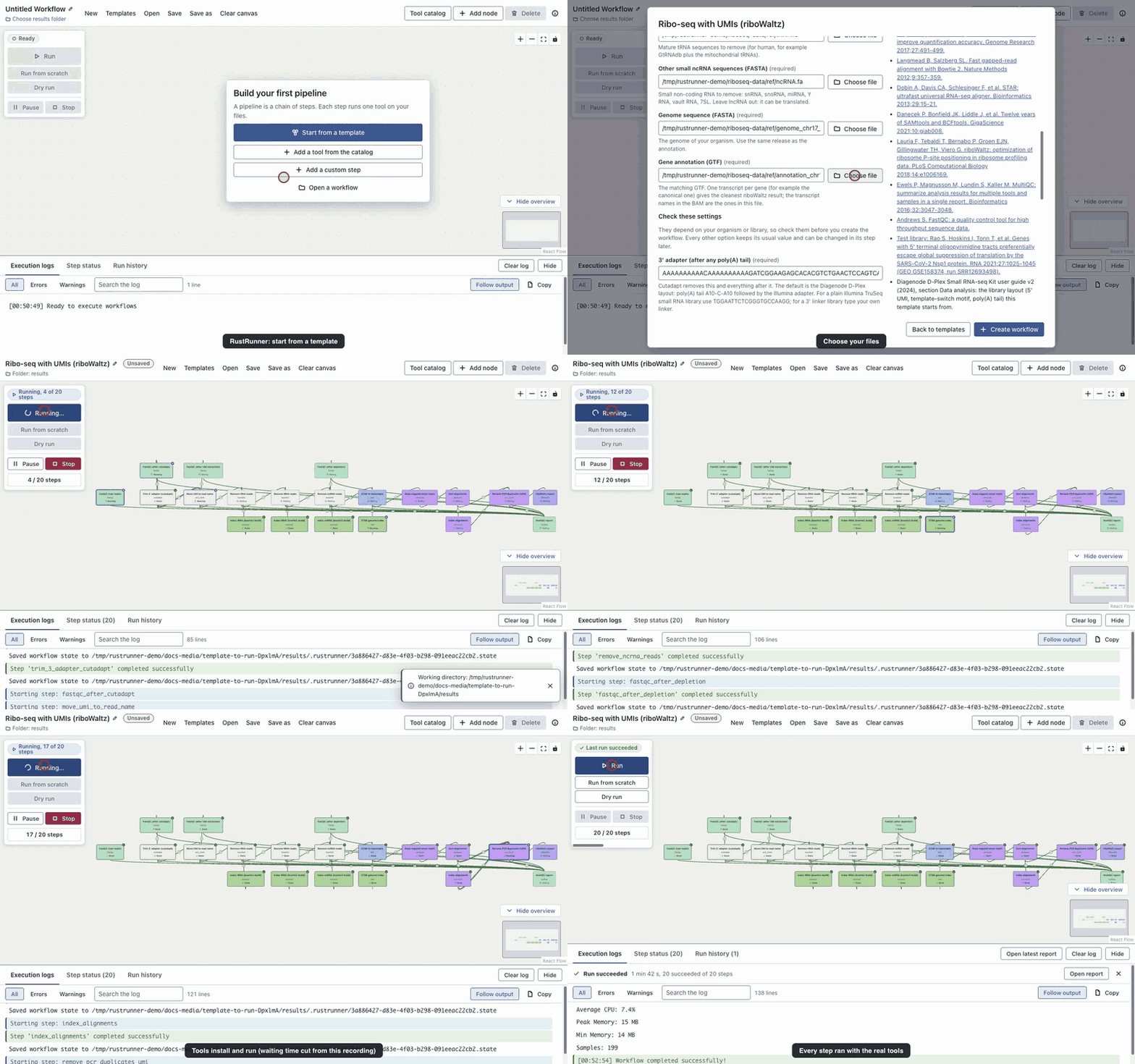
A real run on public human HEK293T data (GEO GSE158374, run SRR12693498), start to finish in the app. 20 steps: FastQC, Cutadapt, UMI-tools extract, Bowtie2 build, Remove reads matching a database (bowtie2), STAR genome index, STAR (Ribo-seq, transcriptome BAM), samtools view, samtools sort, samtools index, UMI-tools dedup, riboWaltz report, MultiQC.
Before you start
- Install RustRunner (download) or run it from source.
- Get the data:
./riboseq-test/prepare_data.shin the repository builds the reads and references (about 610 MB of checksummed downloads). Details and provenance are in DATA.md. - On Apple silicon STAR runs as an Intel build, so Rosetta must be installed.
- Allow network access and a few GB for the first run, which installs the tools.
1. Choose the template
Click Templates, type ribo, and pick Ribo-seq with UMIs (riboWaltz). The right-hand column draws the pipeline and lists what you will get.
2. Choose your files
| Field | Example file |
|---|---|
| Sequencing reads (FASTQ) | sample.fastq.gz |
| rRNA sequences (FASTA) | rRNA.fa |
| tRNA sequences (FASTA) | tRNA.fa |
| Other small ncRNA sequences (FASTA) | ncRNA.fa |
| Genome sequence (FASTA) | genome.fa |
| Gene annotation (GTF) | annotation.gtf |
3. Check the settings of your library
These depend on the kit, so the template asks before it builds the workflow. The defaults are those of the public test library (Diagenode D-Plex: a 12-base UMI and 4 template-switch bases at the 5' end, poly(A) tail and adapter at the 3' end).
| Setting | Default |
|---|---|
| 3' adapter (after any poly(A) tail) | AAAAAAAAAACAAAAAAAAAAGATCGGAAGAGCACACGTCTGAACTCCAGTCAC |
| Shortest read kept by cutadapt (UMI and spacer included) | 36 |
| UMI position in the read | 5' end (the start of the read) |
| UMI length (bases) | 12 |
| Bases to remove next to the UMI | 4 |
| Shortest footprint to analyse (nt) | 28 |
| Longest footprint to analyse (nt) | 34 |
| Adjust P-site offsets to the reading frame | Yes, where the CDS frame is clearly better |
| Mismatches allowed in STAR | 2 |
| Most places a read may align to | 1 |
4. Create the workflow and run it
Click Create workflow. The 20 steps appear on the canvas, connected, with no problems listed. Choose an empty results folder outside the data folder, then click Run. The first run installs the tools into isolated environments (5 to 20 minutes on a normal connection); later runs reuse them. Independent steps, such as the three index builds, run side by side.
5. What you get
- riboWaltz report. One self-contained HTML page: read lengths, P-site offsets, periodicity, region counts, codon usage. Open it in a browser.
- P-site offsets table. psite_offsets.tsv: where the P-site sits for each read length.
- Deduplicated transcript alignments. The BAM riboWaltz read, one read per UMI and position.
- Combined QC report. Open multiqc_report.html: FastQC at four points, cutadapt, the three depletion steps, STAR and the deduplication log.
- Trimming report. How many reads had the adapter and how many were dropped as too short.
- rRNA removal summary. How much of the library was rRNA.
- STAR mapping summary. Log.final.out: unique, multi-mapped and unmapped reads.
- Deduplication log. Reads in and out of UMI-tools dedup.
What the run looked like
On the 5-million-read file, measured on an Apple M5 Pro (tools already installed, STAR under Rosetta), the whole workflow took about two minutes. 95.9 % of reads carried the adapter, about 70 % of them matched rRNA and were removed, and riboWaltz found P-site offsets of 12 to 13 nt with 96 % of P-sites in the coding sequence. The 200,000-read file is too small for riboWaltz to estimate offsets; the report says so instead of inventing numbers. See the test README for every expected number and what to look at critically.
References
- Martin M. Cutadapt removes adapter sequences from high-throughput sequencing reads. EMBnet.journal 2011;17:10-12.
- Smith T, Heger A, Sudbery I. UMI-tools: modeling sequencing errors in Unique Molecular Identifiers to improve quantification accuracy. Genome Research 2017;27:491-499.
- Langmead B, Salzberg SL. Fast gapped-read alignment with Bowtie 2. Nature Methods 2012;9:357-359.
- Dobin A, Davis CA, Schlesinger F, et al. STAR: ultrafast universal RNA-seq aligner. Bioinformatics 2013;29:15-21.
- Danecek P, Bonfield JK, Liddle J, et al. Twelve years of SAMtools and BCFtools. GigaScience 2021;10:giab008.
- Lauria F, Tebaldi T, Bernabo P, Groen EJN, Gillingwater TH, Viero G. riboWaltz: optimization of ribosome P-site positioning in ribosome profiling data. PLoS Computational Biology 2018;14:e1006169.
- Ewels P, Magnusson M, Lundin S, Kaller M. MultiQC: summarize analysis results for multiple tools and samples in a single report. Bioinformatics 2016;32:3047-3048.
- Andrews S. FastQC: a quality control tool for high throughput sequence data.
- Test library: Rao S, Hoskins I, Tonn T, et al. Genes with 5' terminal oligopyrimidine tracts preferentially escape global suppression of translation by the SARS-CoV-2 Nsp1 protein. RNA 2021;27:1025-1045 (GEO GSE158374, run SRR12693498).
- Diagenode D-Plex Small RNA-seq Kit user guide v2 (2024), section Data analysis: the library layout (5' UMI, template-switch motif, poly(A) tail) this template starts from.